
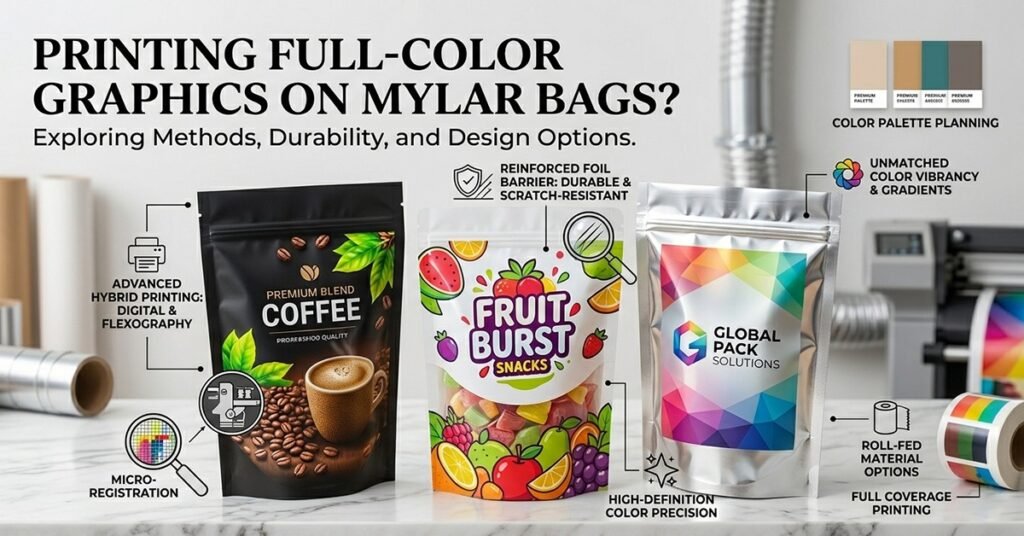
Businesses considering custom mylar bags for food, supplements, cannabis, or specialty products often discover that printing capabilities differ significantly from standard cardboard packaging. Full-color graphics enhance brand recognition, communicate product information, and create shelf appeal that plain silver or kraft mylar bags cannot achieve. However, mylar’s slick surface, material composition, and barrier properties create technical challenges requiring specific printing methods and design considerations that standard packaging printing cannot simply transfer.
This guide explains which printing methods work on mylar bags, how durability compares across techniques, design specifications unique to mylar printing, and how to achieve professional full-color results without exceeding budgets or production timelines.
Quick Answer: Full-color printing on mylar bags is possible using flexographic, rotogravure, or digital printing methods, but each technique offers different color vibrancy, durability, and cost profiles. Flexographic printing delivers the most affordable full-color mylar printing at quantities over 5,000 units with good durability and color accuracy. Digital printing on mylar works for smaller runs (250-2,500 units) but costs more per unit and may show limited durability compared to flexographic alternatives. Rotogravure produces premium results with exceptional color depth and durability but requires 10,000+ unit minimums.
Why Does Printing on Mylar Present Unique Challenges?
Surface Properties and Ink Adhesion
Mylar’s smooth, impermeable surface resists ink adhesion unlike porous materials such as paper or cardboard where ink absorbs into fibers. Inks that bond well to absorbent substrates may sit on mylar surfaces susceptible to flaking, peeling, or fading without proper surface preparation and ink chemistry.
The slick mylar surface requires specialized ink formulations designed specifically for non-porous, plastic materials. Standard packaging inks formulated for paper cannot adhere reliably to mylar without extended drying times, special primers, or surface treatments increasing production costs.
Corona treatment or plasma treatment pre-processes mylar surfaces improving ink adhesion by creating microscopic texture allowing inks to grip material more effectively. This treatment adds cost and complexity to mylar printing setup but ensures durable results.
Thermal stress from heat during printing or sealing operations can cause printed inks to shift or fade if not properly formulated. Flexographic and rotogravure inks withstand higher temperatures better than digital inks, explaining durability differences between printing methods.
Mylar’s barrier properties that protect product contents can paradoxically interfere with ink adhesion. The material resists absorption by design, requiring printing techniques working with rather than against this characteristic.
Environmental Exposure and Fading
Printed mylar bags exposed to light, moisture, or temperature fluctuations during storage and retail display may show color fading or degradation if inks and varnishes lack UV protection. Products with long shelf lives require printing durability matching product lifespan.
Oil-based or grease exposure from food products can degrade certain ink types causing discoloration or adhesion failure. Printing formulations must account for product contact risk, particularly for products containing oils or moisture-prone items.
Temperature cycling during shipping, storage, and retail display can cause ink adhesion failure if thermal expansion/contraction between mylar and ink creates stress. Proper ink selection and curing prevents temperature-related durability issues.
Humidity and moisture exposure particularly affects food products releasing moisture during shelf storage. Water-resistant varnishes and inks formulated for food contact applications prevent moisture-related degradation.
Design File and Color Specifications
RGB colors converted to CMYK for mylar printing show different vibrancy than on white substrates due to mylar’s reflective, metallic surface. Colors may appear duller on mylar than on paper, requiring compensation during design and color specification phases.
Fine detail and small text may not reproduce cleanly on mylar depending on printing method. Flexographic printing handles bold graphics and solid colors better than fine gradients or intricate detail. Rotogravure handles detail better but at higher costs.
Bleed areas, safe zones, and dieline specifications differ between mylar printing methods. Digital printing requires stricter precision while flexographic allows slightly more tolerance. Design files must account for printing method specifics.
Translucent mylar allows background color to show through printed areas. Designing for mylar requires considering color interactions between inks and visible product through packaging, unlike opaque substrates where printed colors appear isolated.
What Printing Methods Work Best for Full-Color Mylar Bags?
Flexographic Printing: The Standard for Volume Production
Flexographic printing uses flexible rubber or photopolymer plates applying inks to mylar through direct contact. This method dominates high-volume mylar bag production due to cost efficiency, durability, and established infrastructure in packaging industry.
Flexographic printing handles bold graphics, solid colors, and photographic imagery reasonably well for most food and product packaging applications. Color vibrancy reaches acceptable levels for retail products though may not match rotogravure’s depth or digital printing’s precision.
Setup costs for flexographic ($300-600 per color) involve creating printing plates and configuring equipment. Per-unit costs decrease significantly at higher volumes, making flexographic most economical above 5,000-unit minimums.
Flexographic inks adhere exceptionally well to mylar when properly formulated and applied. Printed graphics remain durable through 5+ years of storage, handling, and retail display without significant fading or adhesion failure.
Drying and curing happens relatively quickly with flexographic inks, allowing production timelines of 8-12 business days typical for mylar bag orders. This speed suits businesses with standard lead times without requiring expedited production.
Multiple color passes allow full-color printing with precise registration (alignment between colors). Four-color process (CMYK) produces full-color images, while spot color applications (Pantone colors) deliver exact brand colors.
Rotogravure Printing: Premium Quality for High-End Products
Rotogravure uses engraved cylinders applying inks with exceptional precision and color depth. This method produces premium results rivaling fine art printing with photographic color quality impossible to achieve through other mylar printing methods.
Color vibrancy, tonal gradations, and fine detail reproduction through rotogravure exceed flexographic and digital printing capabilities. Premium cosmetics, luxury supplements, or high-end food products justify rotogravure investment where packaging significantly influences purchase decisions.
Rotogravure setup costs ($800-1,500+) reflect engraved cylinder creation requiring skilled craftspeople and precision equipment. Per-unit costs ($0.22-0.45 at high volumes) remain competitive with flexographic at significant quantities but higher minimums (10,000+ units) limit accessibility for smaller businesses.
Environmental considerations favor rotogravure for certain applications. Solvent-based rotogravure inks provide superior adhesion and durability on mylar compared to water-based alternatives, though environmental regulations increasingly restrict solvent use.
Rotogravure timelines typically extend 3-4 weeks from approval to production start due to cylinder engraving complexity. This longer timeline requires earlier ordering but rewards patience with exceptional printing quality.
Digital Printing: Flexibility for Small Batches and Testing
Digital printing (toner-based or inkjet) applies inks directly to mylar without intermediate plates or cylinders. This method enables small-batch production, quick turnaround, and design flexibility impossible with flexographic or rotogravure approaches.
Digital printing on mylar faces durability challenges since inks formulated for paper don’t adhere as reliably to plastic surfaces. Adhesion failure, fading, and peeling can occur within 1-2 years of storage or retail display if using standard digital inks.
Specialty mylar-compatible digital inks improve adhesion and durability approaching 3-4 years under standard storage conditions. These formulations cost more per unit but prevent adhesion failure issues affecting standard digital printing on mylar.
Digital printing quality for photographs and gradients exceeds flexographic output delivering smooth transitions and fine detail. However, vibrancy of solid colors may appear less intense than flexographic printing on mylar’s reflective surface.
Setup costs for digital printing ($150-250) remain minimal compared to flexographic or rotogravure. Per-unit costs ($0.35-0.65) at small quantities make digital viable for sampling, testing, or low-volume specialty products.
Production timelines for digital printing compress to 3-5 business days allowing rapid turnaround for urgent orders. This speed suits businesses needing quick packaging iterations or testing designs before committing to flexographic production.
Minimum order quantities for digital mylar printing start at 250 units with some suppliers accepting 100-unit orders at premium pricing. This accessibility enables startups and small businesses to test mylar bags packaging before large volume commitments.
Rotogravure vs. Flexographic: When Premium Quality Justifies Cost
Choose rotogravure when product positioning demands exceptional printing quality and budget supports premium approach. Luxury supplements, artisanal foods, or high-end cosmetics in $30+ price points justify rotogravure investment where packaging elevates perceived value.
Flexographic suits mainstream products, food items, cannabis, and supplements in $5-15 price points where good printing quality meets customer expectations without justifying premium printing costs. Retail products at these price points benefit from professional appearance without requiring fine-art reproduction quality.
Flexographic proves more practical for products with multiple SKUs since setup costs decrease per-unit with volume while rotogravure requires separate cylinders per design. Brands with 5+ product varieties favor flexographic allowing reasonable setup costs for each product.
Consider customer viewing distance when choosing between methods. Retail shelf products viewed from distance show acceptable quality through flexographic printing. Premium gift items or products examined closely benefit from rotogravure’s detail and color depth.
Test small batches with digital printing before committing to flexographic or rotogravure. Digital samples reveal how your specific product, colors, and design elements translate to mylar, informing premium printing method decisions.
How Durable Is Printed Graphics on Mylar Bags?
Durability by Printing Method
Flexographic printing durability typically extends 5+ years under standard storage conditions (room temperature, indirect light) without significant fading or adhesion failure. Products with multi-year shelf lives benefit from flexographic’s proven longevity.
Rotogravure printing demonstrates exceptional durability matching or exceeding flexographic (5+ years) due to superior ink formulation and adhesion achieved through engraved cylinder precision. Premium positioning justifies rotogravure investment partly through demonstrated durability supporting longer product guarantees.
Digital printing on mylar using standard inks may show visible fading or adhesion issues within 1-2 years, particularly with exposure to light, heat, or moisture. Using specialty mylar-compatible digital inks extends durability to 3-4 years approaching flexographic performance.
Spot varnish or protective overprint applied after printing significantly extends durability across all methods by protecting inks from environmental exposure. Aqueous or UV varnish costs $0.05-0.10 per bag but prevents fading and adhesion failure for products with long shelf lives.
Environmental Factors Affecting Durability
Direct sunlight exposure accelerates fading regardless of printing method or ink formulation. Products stored under retail lighting or displayed near windows show color degradation faster than products kept in dark storage.
Temperature cycling during shipping, warehousing, and retail display creates thermal stress that can compromise ink adhesion if inks and mylar have different expansion/contraction rates. Proper ink selection and curing procedures prevent temperature-related failures.
Moisture exposure from ambient humidity or product release (for items like spices, dried herbs, or hygroscopic products) can degrade certain inks. Water-resistant varnishes and moisture-barrier mylar materials protect printed graphics from humidity-related degradation.
Oil or grease contact from product contents (nuts, chocolate, coffee oils) may cause ink discoloration or adhesion failure if inks lack food-contact compatibility. Specialty ink formulations for food contact applications prevent oil-related degradation.
UV exposure during storage and retail display fades standard inks while UV-resistant varnish or UV-stable ink formulations maintain color integrity. Products with long shelf lives or retail display exposure warrant UV protection investment.
Factors Improving Durability Beyond Printing Method
Aqueous or UV varnish applied as overprint protects ink from environmental exposure adding $0.05-0.10 per unit cost while extending durability significantly. This cost-effective enhancement suits products with uncertain shelf life or high display risk.
Specialty ink formulations designed specifically for mylar surfaces improve adhesion and durability compared to standard packaging inks. These formulations cost slightly more but prevent adhesion failure and fading issues compromising cheaper alternatives.
Proper curing procedures during and after printing ensure complete polymerization of inks preventing premature failure. Rush production skipping adequate curing compromises durability, making standard production timelines preferable.
Black mylar or opaque background colors hide some fading better than clear or light-colored mylar. Designs minimizing transparent areas where color degradation shows most extend apparent durability.
Storage conditions significantly impact printed graphic longevity. Storing finished bags at room temperature in dark, dry environments prevents fading while temperature fluctuation or humid storage accelerates degradation.
What Design Specifications Matter for Mylar Bag Printing?
Color Specification and Accuracy
Specify colors using CMYK values (cyan, magenta, yellow, black percentages) for flexographic and rotogravure printing allowing accurate reproduction within printing method capabilities. CMYK values translate to printable ink combinations better than RGB specifications.
Pantone spot colors (like Pantone 485 C for red) ensure exact brand color matching for critical elements like logos. Spot colors require separate printing passes increasing costs but guarantee color accuracy for brand-critical applications.
Request color proofs showing how colors appear on actual mylar material before committing to production. Colors appear different on mylar’s reflective surface compared to white paper, requiring approval on intended substrate.
Understand that bright, vibrant colors on translucent clear mylar appear different than on white or black mylar. Color selection should account for mylar type and visible product behind packaging affecting final appearance.
Large solid color areas may show slight variation across printing runs. Gradients, patterns, or textured backgrounds mask inconsistencies better than flat solids, particularly with flexographic printing.
File Specifications and Technical Requirements
Submit files in Adobe Illustrator (.ai) or PDF format with outlined fonts preventing font substitution issues. Vector files scale without quality loss ensuring artwork maintains sharpness across different bag sizes.
Images must be minimum 300 DPI (dots per inch) at actual print size for flexographic and rotogravure. Lower resolution shows pixelation or blurriness when printed at full scale. Digital printing allows slightly lower resolution (240 DPI minimum) but 300 DPI remains standard.
Include 0.25-inch bleed extending background colors beyond trim lines ensuring no white edges if cutting shifts slightly during production. Bleed prevents visible unprinted mylar showing at bag edges.
Maintain 0.25-inch safety zone keeping important content like logos and product names at least 0.25 inches from trim lines preventing accidental cutting.
Convert all fonts to outlines before submission. Outlined text becomes vector shapes preventing font substitution if printing facilities lack your specific fonts.
Design in CMYK color mode matching printing ink colors rather than RGB used for screens. RGB files convert to CMYK potentially shifting colors from expected appearance.
Design Considerations Unique to Mylar
Account for translucence when designing. Printed colors appear different when product or packaging backing shows through. Light mylar with white or silver backing affects color perception differently than black mylar or backed mylar.
Consider that mylar’s reflective surface shows fingerprints and dust more prominently than matte materials. Glossy finishes enhance this effect while matte topcoatings reduce visibility of handling marks.
Design for multiple bag sizes if offering multiple quantities. Artwork may need adjustment for different proportions preventing awkward spacing on larger or smaller bags.
Plan for zipper and seal areas where printing typically stops. Graphics disappearing behind zipper heads or seal areas should not create incomplete logos or awkward visual breaks.
Include QR codes or variable data elements if offering personalized or limited-run options. Design layouts accommodating these elements prevent last-minute design scrambles.
Design edges allowing slight registration variation (color offset) without creating obvious misalignment. Flexographic printing inherently shows 2-4mm registration tolerance that perfectly aligned designs magnify.
What Color Options Work Best on Different Mylar Types?
Clear Mylar Bags
Clear mylar with visible product inside allows vibrant colors to show well since white or light product contents act as backdrop. CMYK process colors produce good saturation and vibrancy on clear mylar.
Transparent mylar with white printing or light colors may appear washed out since color intensity depends on backing. High-contrast designs with dark inks against transparent areas work better than light-colored graphics.
Avoid very light pastels on clear mylar since transparency reduces perceived color saturation. Bold, vibrant colors translate better to clear mylar printing than subtle gradations.
Design for dual visibility where printed graphics appear professional on shelf while product visible inside enhances appeal. Color selections should complement rather than clash with visible product contents.
Silver or White Mylar Bags
Silver and white mylar provide opaque backgrounds allowing full-color printing with excellent color saturation and vibrancy. These backdrops display CMYK colors and spot colors with strong intensity.
Gradients, photographic images, and complex color blends reproduce exceptionally well on white or silver mylar since background opacity provides consistent color foundation.
White mylar allows color printing similar to cardboard packaging while providing superior moisture and oxygen barrier properties. This combination suits food products needing both protection and visual appeal.
Silver mylar provides metallic appearance for premium positioning while accepting full-color printing over silver base. The metallic effect adds luxury perception even with basic printing.
Black Mylar Bags
Black mylar provides dramatic backdrop making light colors and white accents stand out prominently. Design contrast becomes critical since dark background diminishes some color saturation.
Avoid dark colors (navy, dark red, dark green) on black mylar since insufficient contrast makes designs disappear. Bright colors, whites, and light accents work best.
Metallic or fluorescent inks on black mylar create striking visual impact. These specialty inks cost more but create premium appearance appealing for luxury products or niche markets.
Black mylar with white printing creates high-contrast, minimalist aesthetic suitable for premium positioning or brands emphasizing simplicity.
How Should Businesses Choose Between Printing Methods?
Evaluating Total Cost
Calculate total investment including setup costs, per-unit printing charges, minimum order quantities, and timeline considerations. Digital printing at 500 units may cost less total than flexographic at higher per-unit rates despite flexographic appearing cheaper at high volumes.
Factor in design revisions and sampling costs. Digital printing enables affordable prototyping before committing to flexographic production, potentially justifying digital sampling investment preventing expensive flexographic mistakes.
Consider material costs separately from printing. Mylar bag material costs remain constant regardless of printing method, so printing method selection focuses on ink application efficiency.
Account for varnish or protective coating costs if desired. Specialty finishes adding durability may justify premium printing methods or be applied after flexographic printing reducing overall costs.
Matching Method to Business Stage
Startups and small businesses should use digital printing (250-1,000 units) for initial orders testing market response and customer feedback before committing to flexographic volumes and minimums.
Businesses with validated product-market fit and steady sales (1,000+ units monthly) benefit from flexographic printing’s lower per-unit costs despite higher minimums and setup fees.
Premium brands positioning products as luxury goods should evaluate rotogravure for exceptional printing quality justifying premium pricing and supporting elevated brand perception.
Businesses with multiple SKUs face lower total setup costs through flexographic (per-SKU costs decrease with volume) compared to rotogravure requiring separate cylinders per design.
Sampling and Testing Process
Order digital samples ($45-85) seeing how specific colors, graphics, and products translate to mylar before committing to flexographic production. Digital samples reveal color shifts, detail reproduction, and overall appearance.
Request flexographic samples ($100-150) if planning high-volume orders. Flexographic samples show actual production appearance and durability potential better than digital.
Test durability on samples exposing them to light, temperature cycling, or moisture simulating actual storage and display conditions. Extended testing reveals adhesion issues or fading problems before large production runs.
Photograph samples from customer perspective with professional lighting documenting colors as customers see them. These photos guide color adjustment decisions before production.
What Common Mistakes Should Businesses Avoid?
Design and File Errors
Submitting RGB files instead of CMYK creates color surprises when files convert for printing. Establish CMYK color workflows from design start ensuring accurate color representation.
Using low-resolution images (below 300 DPI) causes pixelated or blurry printing. Check image resolution before file submission preventing production delays while reprints are arranged.
Placing important content too close to trim lines risks cutting off logos, product names, or critical information. Maintain safe zones keeping essential elements at least 0.25 inches from edges.
Failing to convert fonts to outlines causes font substitution issues if printing facilities lack specific typefaces. Text appearing different than designed affects brand consistency and professionalism.
Not including adequate bleed causes white edges showing at bag edges if cutting varies slightly. Bleed extends backgrounds beyond trim lines preventing visible unprinted mylar.
Printing Method Mismatches
Choosing digital printing for 10,000-unit orders when flexographic delivers lower per-unit costs and better durability. Match production volumes to printing method economics.
Selecting rotogravure for products with frequent design changes since cylinder creation costs make design iteration expensive. Use digital or flexographic for products requiring regular updates.
Choosing budget-focused printing without considering durability requirements for products with long shelf lives. Underestimating durability needs creates field failures and customer dissatisfaction.
Using standard packaging ink formulations without considering mylar’s unique surface characteristics. Specialty mylar-compatible inks prevent adhesion failure and extend durability.
Production and Timeline Issues
Submitting files without requesting technical review causing production delays while suppliers request corrections. Pre-submission reviews catch issues preventing costly delays.
Expecting rush production without adequate budget for premium charges. Standard timelines (8-12 weeks for flexographic including design, sampling, production) deliver better results and costs.
Ordering minimum required quantities without stock buffer causing emergency rush orders if demand exceeds projections. Safety stock (2-3 weeks supply) prevents crisis fulfillment needs.
Skipping sampling phase to save costs, then discovering problems after producing 5,000+ units. Sample costs ($100-150) represent insurance against expensive production mistakes.
Final Thoughts
Full-color graphics on mylar bags require careful attention to printing method selection, ink formulation, and design specifications ensuring professional results and durable graphics lasting product shelf life. Flexographic printing delivers cost-effective, durable results for volume production (5,000+ units) while digital printing enables testing and small-batch flexibility (250-2,500 units) at higher per-unit costs.
Design files must account for mylar’s unique properties including smooth, non-porous surfaces requiring specialized inks and protective coatings ensuring durability matching product requirements. Color specification, resolution standards, and technical file preparation directly impact print quality and longevity requiring attention before submitting to production.
Start with digital sampling testing color appearance, design layout, and overall aesthetics on actual mylar before committing to flexographic production. Sample costs prevent expensive mistakes while revealing color shifts unique to mylar’s reflective surface.
Match printing method to business stage, production volumes, and quality requirements. Startups should test with digital printing validating product market response before flexographic volume commitment. Established brands should evaluate flexographic for cost efficiency or rotogravure for premium quality supporting elevated brand positioning.
Work with packaging suppliers experienced in mylar printing providing technical guidance on design specifications, ink formulations, and durability expectations. Expertise in mylar-specific requirements prevents mistakes, extends graphic lifespan, and ensures customers receive professional packaging reflecting product quality.